
• NEWS MIDDLEEAST
  • UAEVARTHA
Thursday, November 5, 2026
UAE Vartha - English
Advertisement
  • UAE
    • Abu Dhabi
    • Dubai
    • Sharjah
    • Ajman
    • Ras Al Khaimah (RAK)
    • Fujairah
    • Umm Al Quwain (UAQ)
  • GCC
  • Kerala
  • India
  • News
    • Business
    • Politics
    • World
    • Science
  • Tech
  • Entertainment
  • Lifestyle
  • UAE
    • Abu Dhabi
    • Dubai
    • Sharjah
    • Ajman
    • Ras Al Khaimah (RAK)
    • Fujairah
    • Umm Al Quwain (UAQ)
  • GCC
  • Kerala
  • India
  • News
    • Business
    • Politics
    • World
    • Science
  • Tech
  • Entertainment
  • Lifestyle
UAE Vartha - English
  • Malayalam News
  • UAE
  • GCC
  • Kerala
  • India
  • News
  • Entertainment
  • Tech
  • Lifestyle
Home Tech

How to Reset Your Instagram Reels Algorithm and Refresh Your Feed

Web Desk by Web Desk
February 6, 2026
in Tech
0
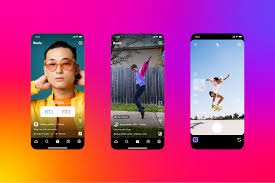
If you feel trapped in a loop of the same Instagram Reels, there’s a simple way to regain control over your feed. Instagram’s Reels algorithm tracks your activity — from which videos you watch till the end to what you like, comment on, or rewatch — and then shows you more of the same. Even accidental taps can push you down an algorithmic rabbit hole, feeding you content you no longer enjoy. To reset the Reels algorithm: Open Instagram and go to your profile. Tap the three-bar More icon in the top-right corner. Select Content Preferences. Tap Reset Suggested Content. Review the information, accept the terms, and confirm. Once done, your feed will gradually start showing content that better aligns with your current interests. Keep in mind, this action is permanent, so choose wisely. Resetting your algorithm is essentially a way to “ghost” your algorithm and take back control of your Instagram experience.
39
SHARES
112
VIEWS
Share on whatsappShare on Facebook

If you feel trapped in a loop of the same Instagram Reels, there’s a simple way to regain control over your feed. Instagram’s Reels algorithm tracks your activity — from which videos you watch till the end to what you like, comment on, or rewatch — and then shows you more of the same. Even accidental taps can push you down an algorithmic rabbit hole, feeding you content you no longer enjoy.

To reset the Reels algorithm:
  1. Open Instagram and go to your profile.
  2. Tap the three-bar More icon in the top-right corner.
  3. Select Content Preferences.
  4. Tap Reset Suggested Content.
  5. Review the information, accept the terms, and confirm.

Once done, your feed will gradually start showing content that better aligns with your current interests. Keep in mind, this action is permanent, so choose wisely. Resetting your algorithm is essentially a way to “ghost” your algorithm and take back control of your Instagram experience.


Web Desk

Web Desk

Dubai Municipality has achieved ISO 14064-1 certification for greenhouse gas measurement, becoming the first entity in the Middle East to secure the benchmark.
Environment

Dubai Municipality achieves ISO 14064-1 certification for greenhouse gas emissions measurement and reporting

Virat Kohli, AB de Villiers, Royal Challengers Bengaluru, IPL, Cricket, Sports News
Sports

AB de Villiers Wishes Virat Kohli on 38th Birthday With ‘Biscotti’ Greeting

Cristiano Ronaldo retires from international football after 23 years, 234 caps, and 146 goals for Portugal, handing over his iconic No. 7 shirt.
Sports

Cristiano Ronaldo Retires from International Football After 23 Years

Global Village Dubai announces a limited free entry offer for November 7. Visitors on Friday can claim one of 3,100 passes for Saturday.
Travel

Dubai’s Global Village Offers Free Entry on November 7

UAE Vartha - English

© 2026 News Middle East. All Rights Reserved.

Navigate Site

  • NEWS MIDDLEEAST
  • UAEVARTHA

Follow Us

  • Malayalam News
  • UAE
    • Abu Dhabi
    • Dubai
    • Sharjah
    • Ajman
    • Fujairah
    • Umm Al Quwain (UAQ)
    • Ras Al Khaimah (RAK)
  • GCC
  • Kerala
  • India
  • News
    • Politics
    • Business
    • World
    • Science
  • Entertainment
    • Gaming
    • Music
    • Movie
    • Sports
  • Tech
    • Apps
    • Gear
    • Mobile
    • Startup
  • Lifestyle
    • Food
    • Fashion
    • Health
    • Travel

© 2026 News Middle East. All Rights Reserved.