
• NEWS MIDDLEEAST
  • UAEVARTHA
Saturday, July 4, 2026
UAE Vartha - English
Advertisement
  • UAE
    • Abu Dhabi
    • Dubai
    • Sharjah
    • Ajman
    • Ras Al Khaimah (RAK)
    • Fujairah
    • Umm Al Quwain (UAQ)
  • GCC
  • Kerala
  • India
  • News
    • Business
    • Politics
    • World
    • Science
  • Tech
  • Entertainment
  • Lifestyle
  • UAE
    • Abu Dhabi
    • Dubai
    • Sharjah
    • Ajman
    • Ras Al Khaimah (RAK)
    • Fujairah
    • Umm Al Quwain (UAQ)
  • GCC
  • Kerala
  • India
  • News
    • Business
    • Politics
    • World
    • Science
  • Tech
  • Entertainment
  • Lifestyle
UAE Vartha - English
  • Malayalam News
  • UAE
  • GCC
  • Kerala
  • India
  • News
  • Entertainment
  • Tech
  • Lifestyle
Home Tech

How to Reset Your Instagram Reels Algorithm and Refresh Your Feed

Web Desk by Web Desk
February 6, 2026
in Tech
0
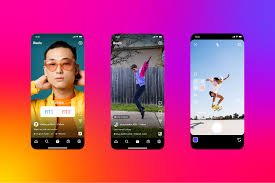
If you feel trapped in a loop of the same Instagram Reels, there’s a simple way to regain control over your feed. Instagram’s Reels algorithm tracks your activity — from which videos you watch till the end to what you like, comment on, or rewatch — and then shows you more of the same. Even accidental taps can push you down an algorithmic rabbit hole, feeding you content you no longer enjoy. To reset the Reels algorithm: Open Instagram and go to your profile. Tap the three-bar More icon in the top-right corner. Select Content Preferences. Tap Reset Suggested Content. Review the information, accept the terms, and confirm. Once done, your feed will gradually start showing content that better aligns with your current interests. Keep in mind, this action is permanent, so choose wisely. Resetting your algorithm is essentially a way to “ghost” your algorithm and take back control of your Instagram experience.
39
SHARES
112
VIEWS
Share on whatsappShare on Facebook

If you feel trapped in a loop of the same Instagram Reels, there’s a simple way to regain control over your feed. Instagram’s Reels algorithm tracks your activity — from which videos you watch till the end to what you like, comment on, or rewatch — and then shows you more of the same. Even accidental taps can push you down an algorithmic rabbit hole, feeding you content you no longer enjoy.

To reset the Reels algorithm:

  1. Open Instagram and go to your profile.
  2. Tap the three-bar More icon in the top-right corner.
  3. Select Content Preferences.
  4. Tap Reset Suggested Content.
  5. Review the information, accept the terms, and confirm.

Once done, your feed will gradually start showing content that better aligns with your current interests. Keep in mind, this action is permanent, so choose wisely. Resetting your algorithm is essentially a way to “ghost” your algorithm and take back control of your Instagram experience.


Web Desk

Web Desk

  • Trending
  • Latest
Renowned Musician and Sharjah Indian School Music Head Anil P Balan Retires After 21 Years

Renowned Musician and Sharjah Indian School Music Head Anil P Balan Retires After 21 Years

July 1, 2026
UAE Weather: Temperatures Set to Hit 46°C as Dust Storms and High Humidity Persist

UAE Weather: Temperatures Set to Hit 46°C as Dust Storms and High Humidity Persist

July 1, 2026
LuLu Hypermarket Announces Massive Midnight Sale Across UAE With Up To 70% Off

LuLu Hypermarket Announces Massive Midnight Sale Across UAE With Up To 70% Off

June 27, 2026
Australia’s FCL Lawyers Expands Global Footprint with New Office in Dubai

Australia’s FCL Lawyers Expands Global Footprint with New Office in Dubai

July 3, 2026
Sharjah brings together UAE, Brazilian and Portuguese investors at Business & Padel Day 2026 to explore new business opportunities

Sharjah brings together UAE, Brazilian and Portuguese investors at Business & Padel Day 2026 to explore new business opportunities

July 3, 2026
UAE Solidifies Position as Global Media Hub with Exponential Growth Across Film, Gaming, and Publishing Sectors

UAE Solidifies Position as Global Media Hub with Exponential Growth Across Film, Gaming, and Publishing Sectors

July 3, 2026
UAE Vartha - English

© 2026 News Middle East. All Rights Reserved.

Navigate Site

  • NEWS MIDDLEEAST
  • UAEVARTHA

Follow Us

  • Malayalam News
  • UAE
    • Abu Dhabi
    • Dubai
    • Sharjah
    • Ajman
    • Fujairah
    • Umm Al Quwain (UAQ)
    • Ras Al Khaimah (RAK)
  • GCC
  • Kerala
  • India
  • News
    • Politics
    • Business
    • World
    • Science
  • Entertainment
    • Gaming
    • Music
    • Movie
    • Sports
  • Tech
    • Apps
    • Gear
    • Mobile
    • Startup
  • Lifestyle
    • Food
    • Fashion
    • Health
    • Travel

© 2026 News Middle East. All Rights Reserved.